Microsoft PowerPoint is one of the most popular and renowned application of MS Office suite, which facilitates user to create slide based presentations for multiple purposes. Nowadays, Presentations are widely used in each and every sector like commercial and business sectors, education institutes, hospitals, small organizations, etc. Generally MS PowerPoint saves the presentation files in PPT file extension and in the newer versions i.e. from MS Office 2007 version these Presentation files are saved in PPTX extension. However, at times PPTX files stored on computer or laptop may get corrupt and pop up any of the below mentioned error messages while accessing:
- There was an error accessing file a:/abc.
- The PPTX file is damaged and cannot be opened.
- PowerPoint found a problem with content in FileName.pptx.
- PowerPoint found a problem with content in the file FileName.pptx and not able to display images, text or objects.
Why PPTX File is Not Opening?
There could be various reasons for the above-mentioned PPTX error messages, let’s see them one by one:
- If the protected views are enabled, the file will be restricted to open.
- The file is blocked.
- Virus infection to storage drive where PPTX files are saved can lead to corruption issues.
- Frequent changing the extension of PPTX file format to another, at times results in corruption issues.
- Sudden system shutdown due to unexpected power failure when PPTX file is in use may corrupt the file.
- Human faults that is; abrupt termination of PPTX file without selecting Exit option might corrupt presentation file.
- Usage of untrustworthy third party application for modifying PPTX files or application malfunctioning due to incorrect installation.
In all the aforementioned scenarios PPTX file gets corrupt and displays error messages while accessing it. Are you one of those users currently experiencing PPTX errors while accessing presentation files? If so, you might be thinking how do I fix a corrupted PPTX file? In the event, if your reply is “NO”, then don’t get annoyed because just by making use of the best file fixer like Remo Repair PowerPoint you can fix the PPTX error accessing file issue with a few clicks of the mouse.
How to Disable Protected Views?
- Launch the PowerPoint application and go to Files.
- Click on the Options tab.
- In the dialogue box select Trust Center > Trust Center Settings.
- Select the Protected View option on the left side of the panel and then Uncheck the options available under Protected View on the right side of the panel.
- Hit OK.
How to Unblock PPTX Files?
- Right-click on the PowerPoint file and choose the Properties option.
- Once the properties of the file are opened, click on the General tab.
- Check the box named Unblock.
How to Fix a Corrupt PPTX File?
Remo Repair PowerPoint is a repair tool, which can repair corrupt PPT, PPTX and PPS files. This tool also repairs and recovers text, formatting, animations, sound effects, images, OLE objects, fields including hyperlinks from corrupt PPT files. Download the tool and experience yourself.
Steps to Fix Corrupt PPXT File using Remo Repair PowerPoint:
Important Note: Do not download the Remo Repair PowerPoint tool on the same drive on which you have the corrupt file, use a healthy drive that is free from all errors and threats.
- Download and install the Remo Repair PowerPoint tool on your system.
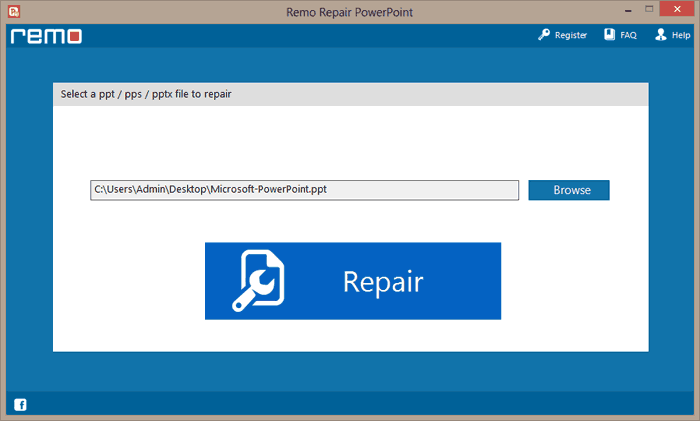
- Launch the application. Now, just browse and locate the PPTX file to be repaired and hit “Repair”.
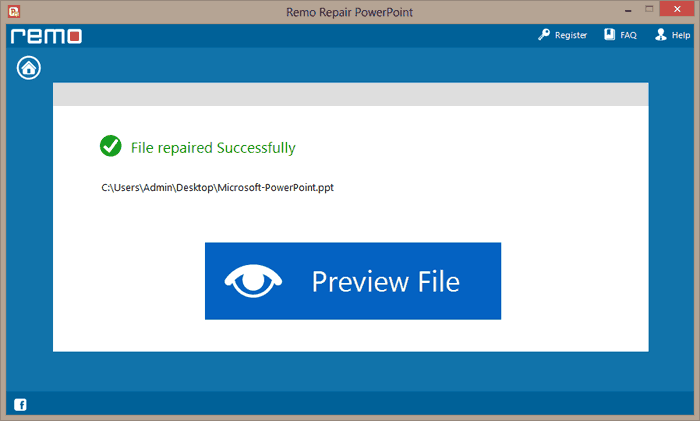
- After completion, preview the repaired file using the “Preview File” option.
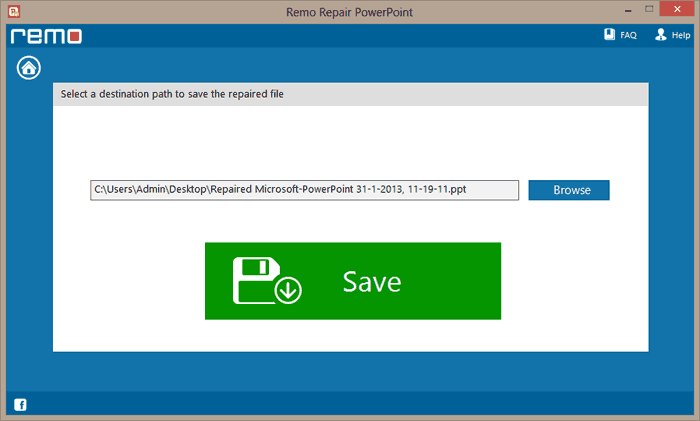
- Provide the destination path and save the repaired file using the “Save” button.
Additional Information: Are you looking for software to repair doc file association issue, then click on the link to get information on repair process...
Conclusion:
Since PowerPoint file corruption occurs unexpectedly without giving any warning and leaves its users with many hardships, everyone needs to be prepared. Hopefully, now you know how to tackle the situation and how to fix the corrupt PPTX file. Please feel free to share your experience with the above-mentioned steps.