OST file is very helpful to solve the problem of interrupted or limited internet connectivity by allowing the users to work offline. With the help of OST file, users can draft emails, set reminders, etc. even if they have disconnected to the mail server. Later this Outlook OST file is synced to the Exchange server and the emails composed offline are sent when the connectivity is established.
Introduction to Outlook OST file cannot be opened
When you open your Outlook profile, you might receive an error message saying “.ost cannot be opened”, stopping you from opening the Outlook application. The main purpose of the OST file is to give accessibility to emails, contact, and calendar data even after not connected to the Microsoft exchange server.
This OST cannot be opened 2016 error neither permits you to access downloaded mails nor allows synchronization between the server and the offline emails.
Why Outlook OST file not opening?
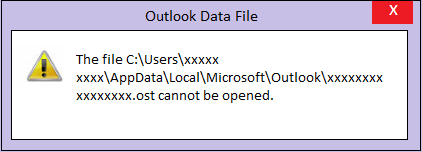
You cannot access your OST file if an error message “OST file cannot be opened” is displayed when you try to open your Outlook account.
This can be due to various reasons and you might try opening the OST file by using various methods such as – starting Outlook OST file in Safe Mode, turning off Compatibility Mode, and so on.
But if nothing works out and the OST file still refuses to open. Then, this doesn’t mean that you cannot access the OST file. By making use of the Remo Convert OST to PST software, fixing the error Outlook data file cannot be opened is easy and quick.
Why OST File Cannot Be Opened?
- Improper installation of Outlook application.
- Outlook in use cannot be accessed error.
- Abruptly terminating Outlook when OST file is still in use.
- Interruption while sharing OST file across network.
- Synchronization error between OST file and Exchange Server mailbox.
- Outlook exchange server is deleted and your OST file is orphaned.
- Exit a broadcast group or organization.
- Improper way of importing OST files
Types Of Methods to Fix OST Cannot Be Opened Error
- Manual Methods
- Using OST to PST converter tool
How to Fix Outlook OST cannot be opened error using manual methods?
- SCANPST.EXE:
Scanpst.exe is an inbuilt Outlook data file repair tool. Normally the OST file does not open due to corruption. In such cases, utilizing Scanpst can automatically fix OST file corruption.
1) Locate and Open the Scanpst.exe tool by following the below path:
a)For Outlook 2016, 2019 if the OST file is not opening, Scanpst.exe can be found in the following path:
C:\Program Files (x86)\Microsoft Office\root\Office 16
b)For Outlook 2013 if the OST file is not opening, Scanpst.exe can be found in the following path:
C:\Program Files (x86)\Microsoft Office\Office 15
c) For Outlook 2007 if the OST file is not opening, Scanpst.exe can be found in the following path:
C:\Program Files (x86)\Microsoft Office\Office 12
2) Click on the Browse option to select the corrupt OST file, and click the Scan button.
3) Click the Repair option to start fixing the error OST cannot be opened.
If the OST file still does not open after being repaired by Scanpst.exe tool, then follow these simple methods:
- Check for Outlook erratic behavior in Task manager:
Open task manager and check if any Outlook process is interrupting the OST file access. Terminate all Outlook related processes by right clicking on the Outlook process from Processes tab and select End task.
Restart Outlook and see if the OST file is now opening.
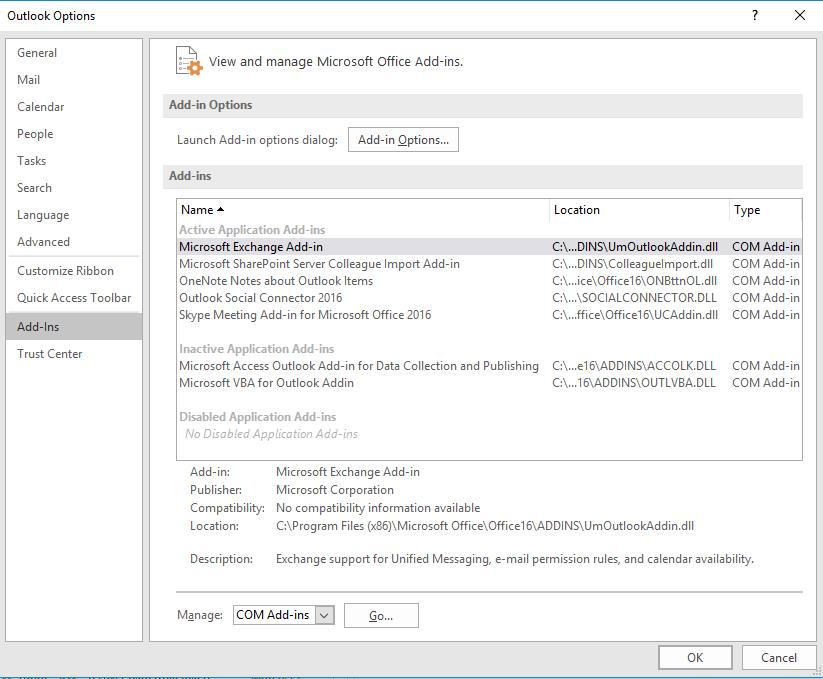
- Find and terminate any Outlook add-ins obstructing OST file access:
Third-party Add-ins are a great way to customize and modify your Outlook access. But they also can be the biggest challenges to access OST files. You can find enabled add-ins in the following path:
File->Options->Add-ins->COM Add-ins, follow this path once you run Outlook as administrator. Uncheck any third party add-ins and check if the OST file can be opened now.
If you are still not able to fix the issue, then head over to the next method i.e., fixing OST cannot be opened error with the help of Remo Convert OST to PST tool.
Why Convert OST file to PST format while fixing Outlook OST cannot be opened error?
Once you have tried all the above manual methods to fix this error, then the only way through which you can fix this error or open the OST file is by converting it into the PST file format.
OST file has limitations when compared to a PST file. It cannot be opened from any Outlook profile. OST file needs Outlook to be configured with port settings of the exchange server that has the exact account credentials as the .ost file in order to open it.
Hence it is of utmost difficulty to repair or access .ost file from anywhere. In such circumstances when you try to get local copies of emails from Microsoft Exchange Server, you will not be allowed to access Outlook OST files.
Remo Convert OST to PST tool is capable of resolving severe corruptions in the OST file structure. This tool safely rearranges the OST file data into PST file format to gain accessibility to the Outlook data file. Hence, this converted PST file can be easily imported to access all your emails, contacts, calendar, rules, attachments, folder structure, etc. Converting corrupt OST to PST using the Remo Convert OST to PST tool is the best way to fix the error OST file cannot be opened.
how to Fix Outlook Data File Cannot Be Opened Using Software?
A quick solution to fix “OST file cannot be opened” error is by using Remo OST to PST Conversion tool.
- Download, Install and Launch Remo Convert OST to PST software.
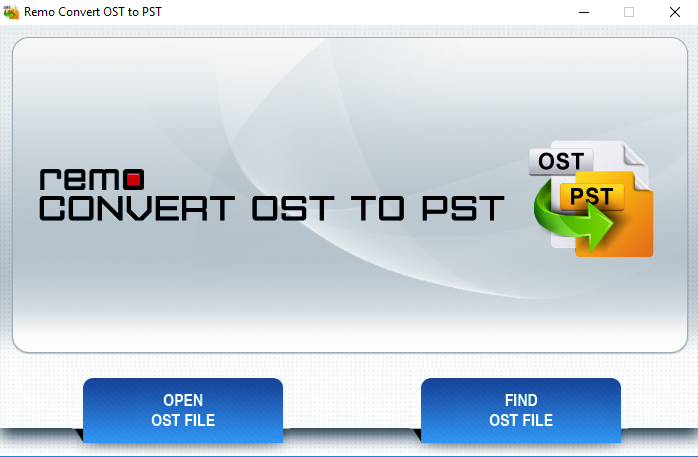
- Launch the software and select Find OST File to automatically select the OST file.
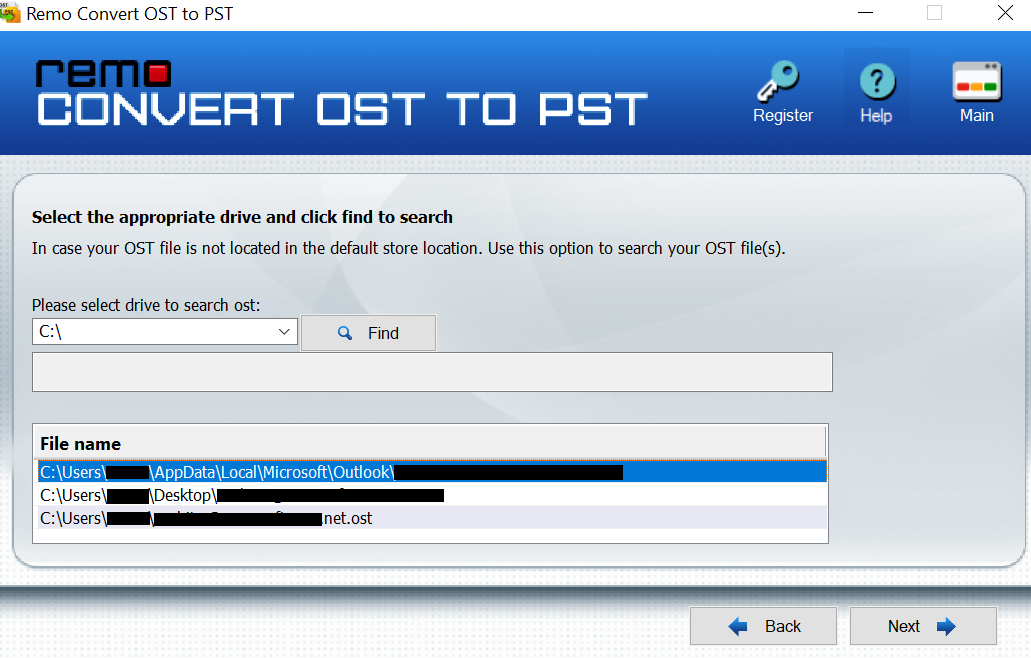
- Then provide the destination path to save the converted file and click Next.
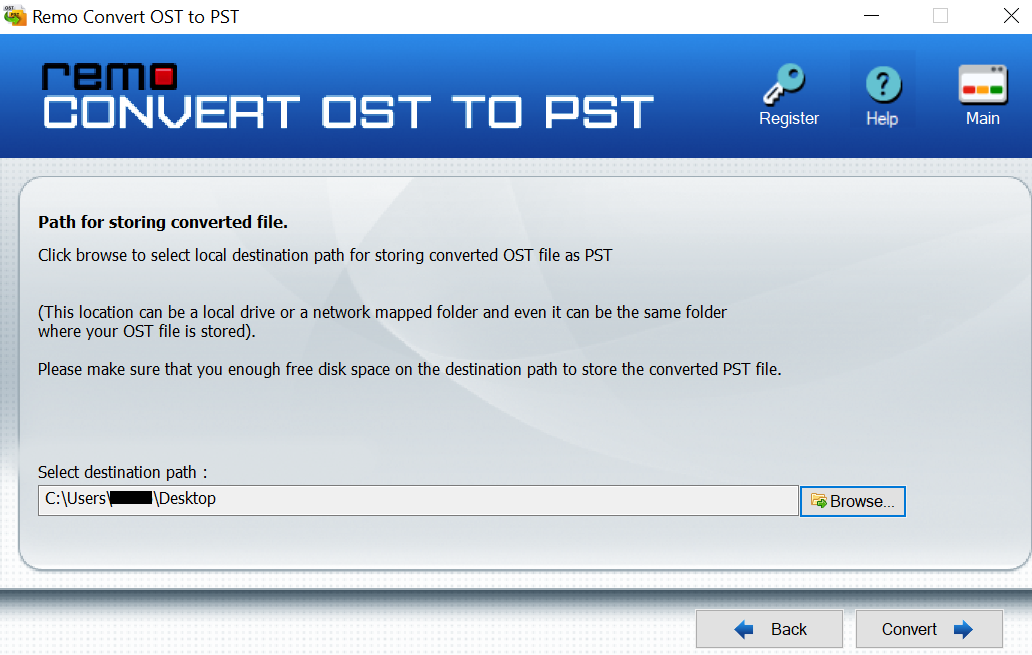
- Finally, click on the Convert button to start the converting process.
Why choose Remo to convert OST to PST?
- Fix the password-protected file or encrypted file.
- Repair the sync errors due to large or inaccessible OST files
- The corrupt OST file is used as a reference and the data is replicated into a new PST file. Hence the original OST file remains untouched.
- Along with fixing the OST file error, the program also recovers its attributes such as emails, tasks, contacts, notes, RSS feeds, etc which are deleted or lost.
- Remo Convert OST to PST software fixes OST files which exceed the file size limit.