Lost your CCTV DVR Videos? Have no idea how to recover your deleted CCTV footage! Do not panic in this article we have mentioned everything you need to know about how to recover your deleted CCTV footage using data recovery software- Remo Recover.
Download and recover all your deleted CCTV footage
Losing a CCTV footage especially when you want to refer to it for evidence, tracking, or even to re watch at a funny incident can be very disappointing. But do not get upset over it because we have written this article to solve your problem on how to recover your deleted CCTV footage. Without further ado, let's get to know more about CCTV footage and how to recover deleted CCTV footage.
Most of the modern CCTV’s have a DVR that records and stores video footage to a local hard drive, cloud server or an offsite server. However, the default preference settings command the DVR to overwrite 1-month old video data with the new video data. This is one of the major reasons why the CCTV footage is deleted automatically.
Another reason where the CCTV footage is deleted automatically is when the storage platform is full and does not have space for any new data. Hence, either the CCTV stops recording or overwrites old video data.
It is always advised to monitor the storage space of your cloud server or local drive where the data is stored. This prevents the automatic deletion of footage in future.
| Storage space | Description |
|---|---|
| On-premises storage | The CCTV footage may be stored on a hard drive or network-attached storage (NAS) device located on your property or in your home or office. |
| Cloud Storage | This is where the footage is stored on a remote server accessed over the internet. This type of storage is typically used for larger-scale surveillance systems or for businesses that require remote access to their footage. |
| Hybrid Storage | This is a combination of cloud and onsite storage, where footage is stored on a physical device and simultaneously backed up to a remote server for additional redundancy. |
| Network-Attached Storage (NAS) | Some CCTV systems allow you to store the footage on (NAS) Network-Attached devices. This allows multiple devices on the same network to access the footage. |
| FTP Server | Some CCTV systems allow you to store the footage on an FTP (File Transfer Protocol) server. This allows you to access the footage from anywhere with an internet connection. |
If your CCTV system has been set up with a backup storage device, it may be possible to recover the deleted footage from the backup.
Sometimes, CCTV footage may be stored on a physical storage device, such as a hard drive or SD card. In such cases, it may be possible to recover the deleted footage using specialized recovery tools or by taking the storage device to a data recovery service.
Remo Recover is a first-in-class data recovery software that recovers all the lost and deleted data it has a user-friendly interface and provides step-by-step instructions for recovering your lost data.
To recover your deleted CCTV footage follow the steps given below:
Step 1: Download, install, and launch Remo Recover on your computer. And connect the hard drive from where the CCTV footage was lost or deleted.
Step 2: Select the drive to recover deleted CCTV footage and hit the Scan button. During the scanning process, you can click on Dyanamic Recovery View to verify the recovery results.
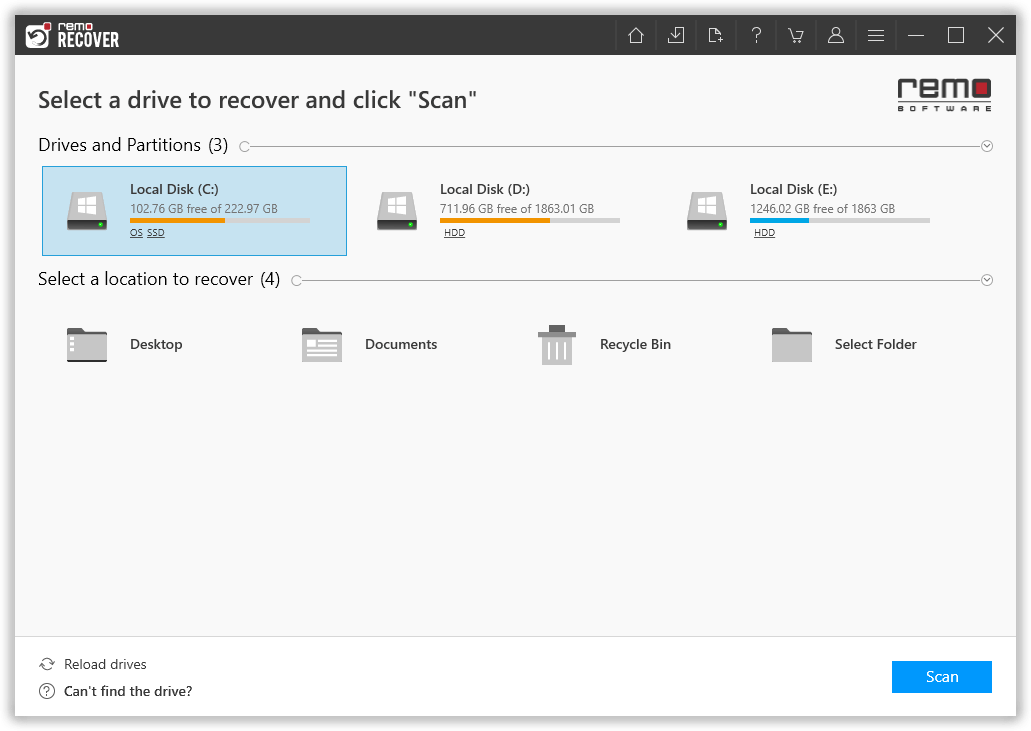
Step 3: Once, the scanning is completed, you can find your deleted CCTV footages under Deleted Files folder. However, the tool automatically starts the Deep scan to recover CCTV footage and other files which can be found under Lost and Found files
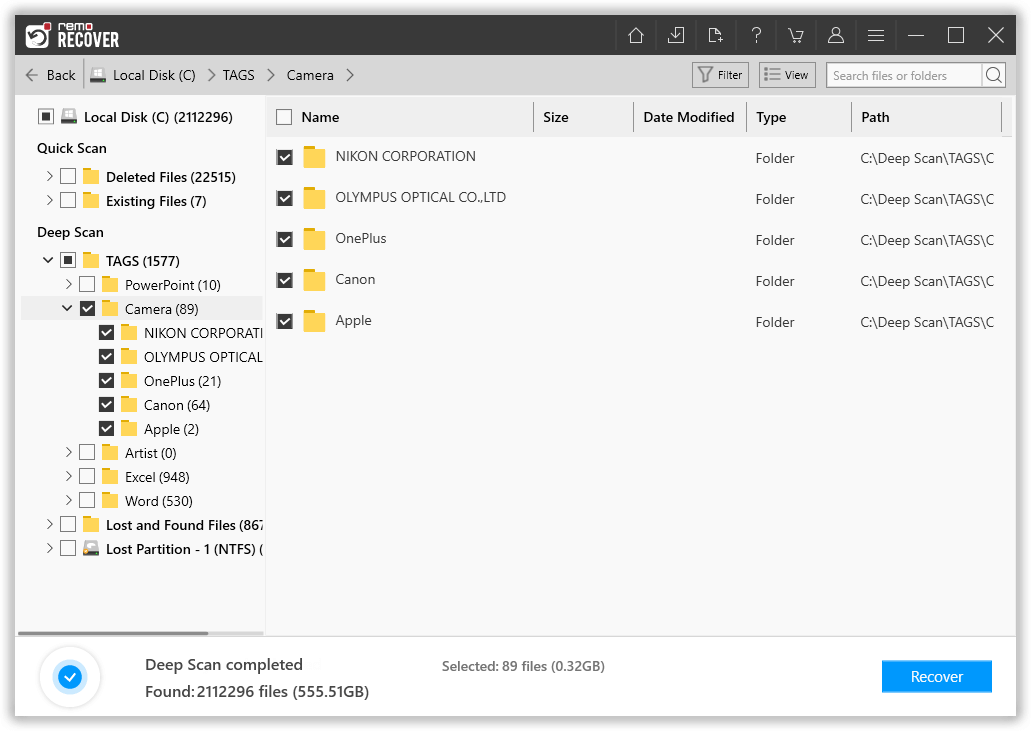
Step 4: You can double-click on the recovered CCTV videos to preview them for free. If you are satisfied with the recovery result, select the footages that you want to get back from hard drive and click on Recover to save on the location of your preference

Note 📌: Do not store the recovered CCTV footage files in the same hard drive from where it was retrieved. Save it on your computer or any other storage drive.
Also Read: How to Repair corrupt CCTV videos?
CCTV footages play a crucial role as primary evidence in cases such as theft, accidents, or daily surveillance. Users need to be aware of recovery tools that actively contribute to retrieving overwritten or deleted CCTV footages. This article provides various methods for recovering deleted CCTV footages, with Remo Recover standing out as one of the top recovery tools. It effectively recovers lost or deleted CCTV footages. Remember to regularly back up your CCTV footage to prevent loss and preserve critical evidence.
Frequently Asked Questions
The CCTV footage is generally stored for up to 90 days in most CCTV cameras.
Yes, old CCTV footage can be recovered using professional recovery tools like Remo Recover.
Why Choose Remo?
100% safeSecure
100% SatisfactionGuarantee
10 Million+Downloads
Free TechSupport
Live Chat24/7 Support

