RAIDs are usually used to avoid loss of important data from your system. When data is lost from one of the hard drives in RAID arrays, recovering raid data becomes tricky. However, below mentioned sections of the article might be of great help for you to perform RAID data recovery.
What is RAID?
Redundant Array of Independent Disk or RAID is a way of storing the same data on multiple hard drives to protect the data from drive failures and increasing system performance.
Can you Recover Data from RAID 5/0/1/10?
It is just an assumption that recovering data from RAID hard drives is complex. Yes, you can perform raid data recovery like recovering data from any hard drive. All you need is a trusted and tried professional RAID data recovery software that can help you restore data from RAID drives.
How to Recover Data from RAID Drives?
As mentioned above, you need a RAID data recovery software to easily recover data from RAID drives. With so many options available, choosing the right one for you can be hard. Hence you should be very careful while you choose a software to undelete raid or recover data from raid.
Designed with an advanced scan engine, tailor made to recover data from RAID drives, Remo Recover software is your safest way to perform RAID data recovery. Download and Try the tool for now on both Mac and Windows operating system.
How to Perform RAID Data Recovery?
Download and Install Remo Recover tool on your computer. Connect the RAID hard drive on which you want to perform hard drive raid recovery and follow the below mentioned steps.
- Download and install the Remo Recover
- Start the recovery process by clicking on the Scan button after selecting the RAID Drive
- If you are unable to find the RAID drive, click on Can’t the Find Drive Option
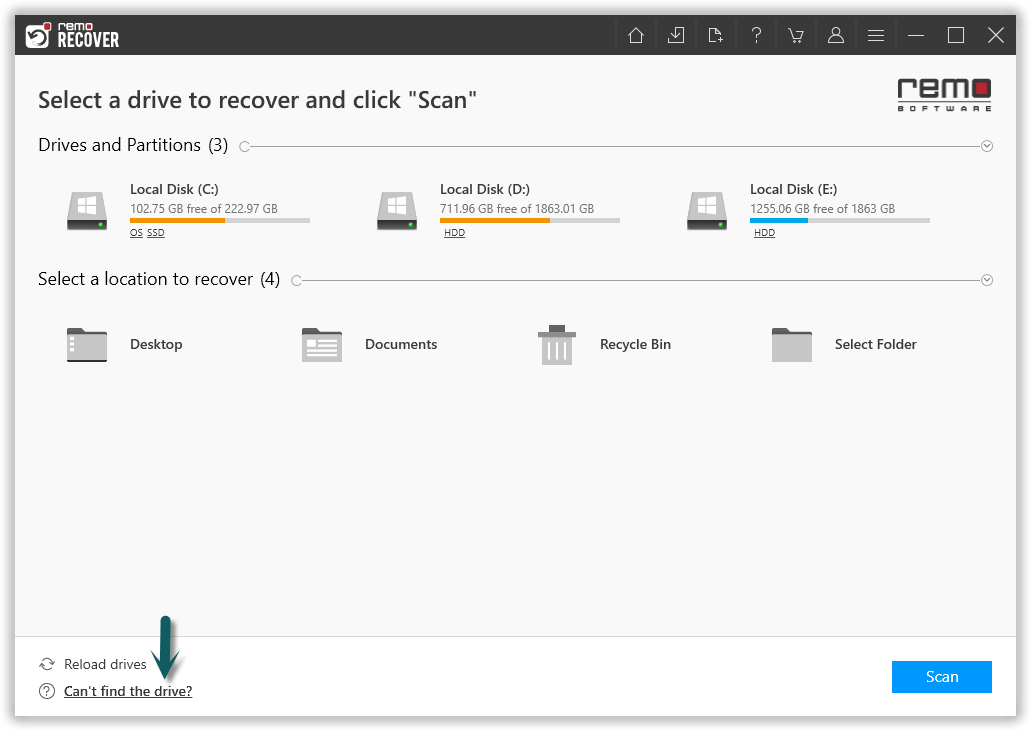
- Press the Scan button once the drive is recognised
- The software will initiate Quick Scan, once scan is complete the tool will run the Deep Scan wherein it recovers data sector by sector of the drive. (Where you will be provided with Dynamic Recovery View) from which you can simultaneously recover data while the Deep Scan is running.
- You can segregate the selective file types by using Advanced Filter.
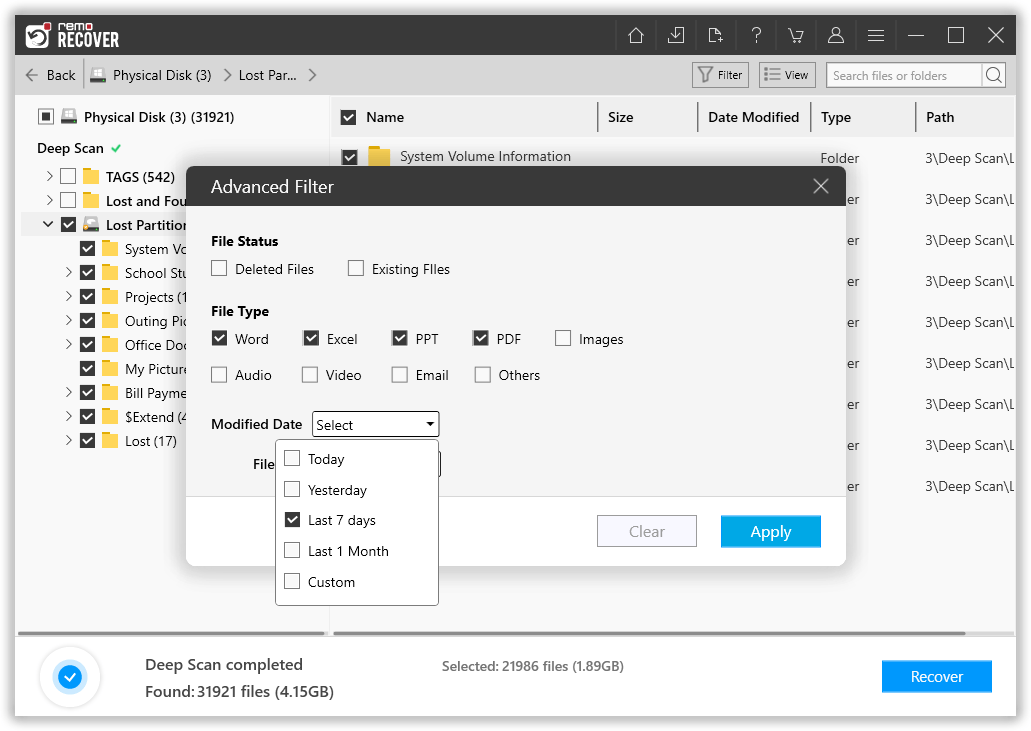
- Now select the folder or files that you want to recover from the RAID drive and click on Recover.
- You will be able to Preview the recovered files and partition.
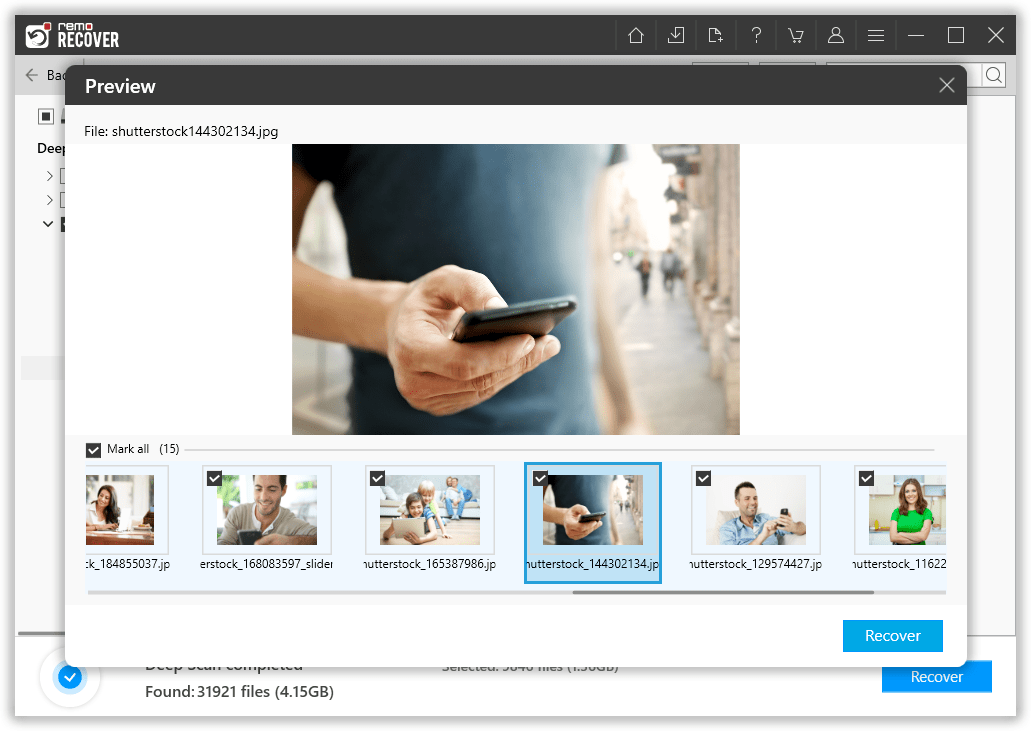
- Choose the needed file, click on Save a browse for a location to save the recovered data.
Standout Features of Remo Recover Software:
- Designed to recover data from RAID 5, RAID 0, RAID 1 and other RAID drives.
- Ensures recovery of RAID files of more than 300 file types.
- Facilitates a preview of recovered raid data after performing hard drive RAID recovery
- Works seamlessly on damaged RAID drives due to RAID controller failure
- Supports in getting data from RAID hard drive on Mac and Windows Operating system.
Common Reasons behind Data loss on RAID Drives
- RAID Controller failure: Most of the RAID storages rely on a single RAID controller. A failure of RAID controller can occur due to external factors like power surges.
-
RAID Partition missing: A corruption to any RAID partition will result in missing of RAID partition. However recovering RAID data from drives can be done easily which you will read more in the later section of the article.
- Virus Attack: Losing data on RAID data due to virus attack or malware infection is very rare as RAID drives are always protected against the possible virus threats. However a malware infection can surely leave RAID system damaged causing huge data loss.
- Improper handling: An accidental deletion or formatting of any RAID drive is an another way of losing RAID data.
Conclusion
Now that you know what RAID is and how to recover data from RAID drive, you no longer will be having the misconception of performing RAID file recovery considered as complex. We hope all the above mentioned sections of the article were helpful in performing RAID data recovery.
Do share the word on social media, if you were successful in recovering data from RAID drives with the help of Remo Recover software.