*Preview repaired files using this free demo

Remo PST Repair Tool: All in one PST Repair Tool to repair damaged, corrupt or inaccessible PST file.
Repair Severely Corrupt PST
Remo PST Repair Tool is designed with an advanced repair algorithm which repairs PST files that are severely damaged, corrupt or even inaccessible.
Recover any Outlook Data items
With Remo PST Repair Software, you can not only repair your PST files but also recover all data items like email, contacts, notes, reminders etc.
Ensures Safe PST repair
Remo Repair PST is popularly known for its read only mechanism that makes sure that no harm is done to the damaged PST file during the repair process.
Repair PST in 3 Clicks only
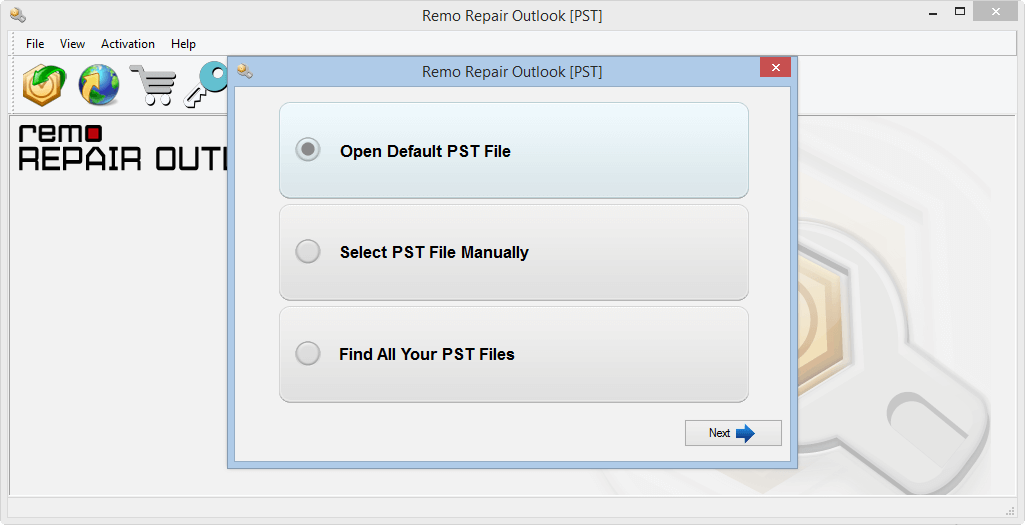
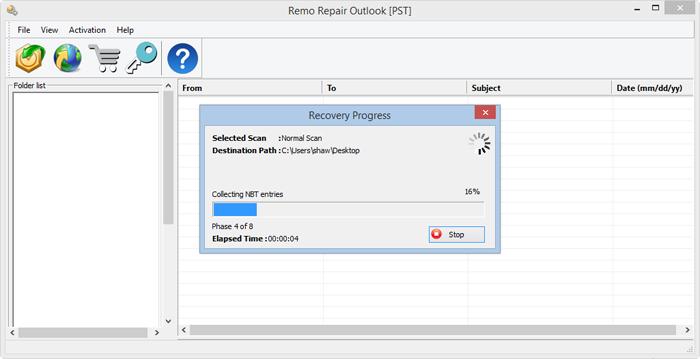
Built with a simple user interface, Remo Outlook PST Repair Tool can repair your damaged PST file in 3 clicks only. Just Select>Scan>Repair.
Expert Reviews
Repair Corrupt, Damaged or Inaccessible PST
It can be overwhelming to comprehend the numbers of factors that can cause damage or corruption in your PST file. Inaccessible or Outlook stuck at processing due to severely damaged PST file can seem to be a major hurdle. Remo PST Repair Tool can repair your PST file meticulously. The tool also helps you repair severely damaged Outlook data file in process of PST file recovery. With Remo PST Repair Software you can flawlessly repair OST file and get back a healthy PST file in no time.
Safe and Secure PST Repair
Fixing PST file using an inbuilt PST repair tool (scanPST.exe) is always an option. However, the repair procedure implemented by Scanpst can jeopardize important data like mails, folders etc. To guarantee the safety of your PST file, Remo Outlook PST Repair Tool uses a read only mechanism to avoid any further damage to your original PST file.
Smart Scan for Complete PST Repair
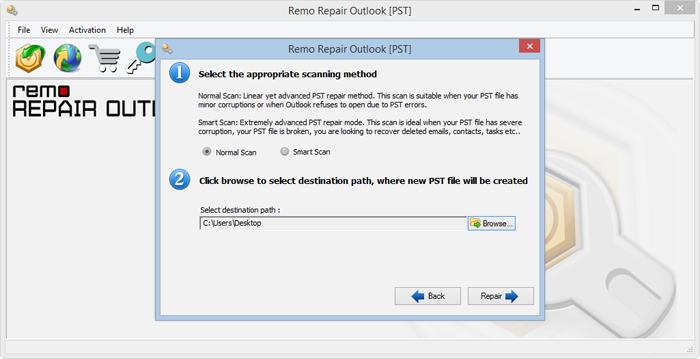
Considering the complexity of the PST file and the amount of time required to fix a PST file, Remo PST Repair provides you a customised repair process. With normal scan for a quick PST repair and Smart scan that enables you to repair severely damaged PST file, the tool fixes your PST file, leaving no stone unturned.
Recover Deleted or Lost Emails from Outlook
PST files hold important data like emails, contacts, notes etc. The whole purpose of repairing the PST file is to get access to all the important data stored in it. You can also recover lost or deleted emails, contacts and other data items with the help of Remo Repair Outlook PST file. As an advantage the tool lets you preview the repaired Outlook data file in an Outlook styled browser for you to verify the success rate of PST repair. It is recommended to take backup of Outlook using Remo Outlook Backup And Migrate to be prepared for data loss on Outlook.
3 Clicks for a Healthy PST File
Although the process of repairing the PST file is complex, Remo’s 3 click to PST repair makes it seem much easier than any other tool. Built with a simple yet descriptive user interface, you can always be sure of repairing PST file irrespective of the scenario or Outlook version. The tool supports all Outlook versions namely Outlook 2003, 2007, 2010, 2013, 2016, 2019 and 2021.
Why Remo PST Repair Tool?
Remo PST Repair Tool not only repairs corrupt PST file but also helps you recover Outlook data from damaged OST file by regenerating a healthy PST file.
PST repair is complete and successful when you have recovered all your Outlook data items from the damaged or corrupt PST file. Remo PST Repair will ensure you a successful PST recovery of emails, contacts, notes etc.
Remo has a well trained technical support team to assist you with the process of repairing PST file. There is no way you can get stuck in the process with our trained team by your side 24/7.
Outlook PST Repair- An Overview
Microsoft Outlook is easily the most recommended and used email service across the globe. Overloaded with features like contacts, notes, reminders etc. the application certainly plays a vital role at modern work space. However, there are various scenarios and many Outlook errors that might lead to corruption of the Outlook data file or PST.
Microsoft inbox repair tool is an inbuilt solution available to fix corrupt PST file. However, the inbox repair tool or the ScanPST has few drawbacks that hinders the PST repair process. Hence, it is recommended to make use of a professional PST repair tool.
Remo PST Repair Tool is the safest software to repair corrupt, damaged, or inaccessible PST file. Built with a robust scan algorithm works with a read only mechanism to ensure safe PST repair. As an added advantage the tool lets you to preview the repaired PST file to judge the success rate of the tool. Download and try the tool for free now.
How to Repair PST File using Remo PST Repair Tool?
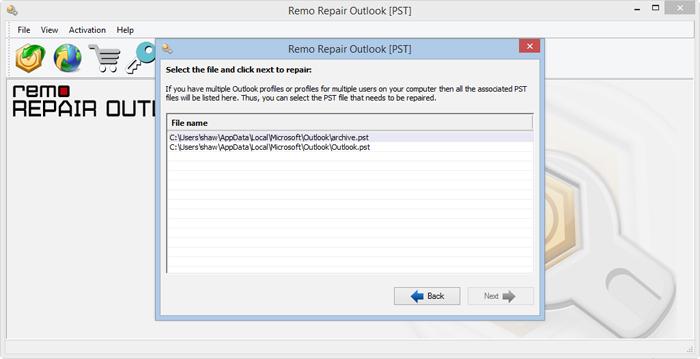
To repair PST file that is damaged or corrupt, download and install Remo PST Repair Tool and follow the below mentioned steps.


Supported File Formats and Outlook versions
Multifunctional tool that repairs any Outlook data file.
Outlook 2003, 2007, 2010, 2013, 2016 and latest Outlook 2019
Recovers emails, tasks, calendars, attachments, etc.
Remo Outlook PST Repair Tool comes in handy under the following scenarios
Frequently Asked Questions
Remo Repair Outlook PST is an advanced tool that fixes corruption issues in PST files and safely restores all mailbox data into a new, healthy PST file, which you can then import back into Outlook.
Microsoft's built-in Inbox Repair Tool (ScanPST.exe) is found in the Outlook installation folder (e.g., C:\Program Files\Microsoft Office\root\OfficeXX\). For older versions of Outlook, check our ScanPST location guide for the exact path. Note: Since ScanPST has limitations, we recommend using Remo Repair Outlook PST for advanced and reliable repair.
To repair a damaged PST file using Remo Repair Outlook PST: Launch the software. Select the damaged PST file. Choose the repair option (Normal or Smart Scan). The tool scans and creates a new healthy PST with all recovered Outlook data. This ensures that even if Microsoft’s ScanPST fails, you can still restore your mailbox.
ScanPST directly works on the original corrupt PST file and tries to repair it. This process is not only time consuming but also risky as any damage to the file can lead to further corruption of PST file. It is better to make use of PST repair tool like Remo than trying your luck with ScanPST.
Remo PST Repair Software is completely safe to use because the tool doesn’t work on the damaged PST file. Instead it makes a copy of the PST file and start working on it to produce a healthy working PST file with it all its data in tact.
No. OST (Offline Storage Table) files store mailbox data for offline use in cached mode, while PST (Personal Storage Table) files store emails, contacts, and other data locally. Remo Repair Outlook PST can repair both OST and PST files. If you need to convert OST to PST, use Remo Convert OST to PST software.
Yes. While Remo Repair Outlook PST repairs corrupt or damaged PST and OST files, Remo also offers a separate tool, Remo Convert OST to PST. It allows you to convert healthy, inaccessible, or orphaned OST files into PST format, making them accessible in Outlook.
Remo PST Repair Tool for Outlook can help you repair your Outlook PST file and recover Outlook data files like emails, contacts, notes, reminders, calendar, reminders along with your Outlook profile settings and rules.
It is recommended for you try Remo PST Repair for free and then you decide if it was a best PST repair software for you. You can always trust Remo PST Repair Tool to get back your Outlook data by repairing your PST file and if in case you find any trouble fixing your PST file you can make use of 24/7 technical assistance provided by Remo. However, these are some of the best PST repair software and best way to repair PST file:
Related Articles
Why Choose Remo?
100% safeSecure
100% SatisfactionGuarantee
10 Million+Downloads
Free TechSupport
Live Chat24/7 Support